Contribution Workflow
The UltraZohm community uses the git-flow branching model since it is easy to apply (more info: Atlassian, Gitflow cheat sheet).
In addition to the git-flow model, Pull Request are used for all merges.
See the Atlassian tutorial for additional information.
It is not possible to merge into the main or develop branches without a pull request.
UltraZohm Workflow
Git-flow is supported by the gitflow extension as well as the GUI clients Sourcetree and GitKraken.
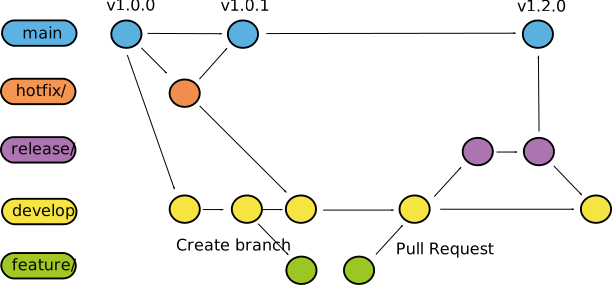
Fig. 17 Visualization of git-flow.
Fig. 17 shows the gitflow. The following branches are used:
main
Exists forever
Stable Version
Version tag after each merge
develop
Exists forever
Current development version
Pull request to merge to
mainIncrement the second number of the version tag by one
feature
Created by contributors to implement features
Pull request to merge into develop
Deleted after pull request is accepted
hotfix
Created by maintainers to fix bugs in
mainPull request to merge to
mainIncrement the last number of the version tag by one
Pull request to merge to
developDeleted after both pull requests are accepted
release
Created by maintainers for major releases
Created by maintainers if merge conflicts occur in pull request from
developtomainResolve merge conflicts
Pull request to merge to
mainIncrement the first number of the version tag by one
Pull request to merge to
developDeleted after both pull requests are accepted
Warning
It is impossible to merge anything without a pull request into main or develop, nor is it possible to push changes to these branches!
Branch names
The naming convention for the branches is as follows:
feature/featurename
Branch of type
feature
featurenamedescribes what feature is implementedExample:
feature/pwm_module
hotfix/hotfixname
Branch of type
hotfix
hotfixnamerefers to the bug which the contribution fixesExample:
hotfix/fix_pwm_counter_overflow
release/releasename_v000
Branch of type
release
releasenameshould describe what features are releasedContains the version number that will be the new tag for the
mainbranch
Version number
The version number is the tag of the commits of the main branch.
Depending on how much the code changed, it is either a revision (only bug fixes were made and no new features are added), a new sub-version (at least one new feature is added), or a new major version (multiple new features, big changes).
v3.1.7
 │ │ │
 │ │ └───────── Revision: bug fixes, no new features (merged a hotfix)
 │ └─────────── Minor release, at least one new feature
 └───────────── Major release
Additional information
Relevant resources for git-flow can be found here: